

13 Oct Website Design Optimization: 10 Tips for 2026
A good-looking website is not enough to win customers in 2026. Your site also needs to load quickly, work smoothly on mobile devices, communicate trust, appear in search results, and guide visitors toward a clear next step. This guide to website design optimization covers ten practical improvements you can make to create a more usable, visible, and conversion-focused website.
Whether you manage a small business website, a service-based company site, or an online store, treat design, performance, accessibility, and search engine optimization as parts of one system. Start with user needs and measurable goals instead of adding features simply because they look impressive; this is the foundation of effective website design optimization.
Table of Contents
1. Design Around Your Visitors’ Goals
Before choosing colors, animations, or layouts, decide what visitors need to accomplish. A potential customer may want to compare services, understand pricing, check reviews, book an appointment, or contact your team. Put the most important information where people can find it without hunting through the site. This simple step makes website design optimization more useful to real visitors.
- Define one primary goal for each important page.
- Use a clear headline that explains what you offer and who it helps.
- Place supporting details and evidence close to the relevant call to action.
- Remove decorative elements that distract from the page’s purpose.
Good website design optimization starts with clarity. A beautiful interface cannot compensate for a confusing offer or a user journey with unnecessary steps.
2. Build a Consistent Color Palette and Visual Identity
Your colors, imagery, spacing, and visual style should make the business recognizable and help users understand the page. Choose a small palette with a primary brand color, supporting colors, neutral backgrounds, and a distinct action color. Use these choices consistently across buttons, links, cards, and forms. Consistency is a practical part of website design optimization because it helps visitors recognize familiar actions.
Check text and interface contrast, particularly for small text and buttons. Do not rely on color alone to communicate errors, status, or selected states. Test the palette on real screens and in both bright and dim viewing conditions.
Consistency is more useful than following a passing design trend. Make sure visual choices support your brand and remain readable for people with different visual needs.
3. Choose Readable Typography and Accessible Layouts
Typography affects how quickly visitors can scan and understand your content. Use a small, consistent type scale, clear heading levels, comfortable line spacing, and paragraphs that focus on one idea. Avoid overly decorative fonts for long passages and make sure text remains readable on mobile screens. Readability should remain a priority in every website design optimization project.
- Use descriptive headings to divide long pages into logical sections.
- Keep body text comfortably readable and avoid long lines on desktop.
- Make links visually distinguishable from ordinary text.
- Provide visible keyboard focus and meaningful labels for form fields.
- Add useful alternative text to informative images; use empty alt text for purely decorative images.
Accessibility is not an optional visual effect. It helps more people use your site and often improves the clarity of the interface for everyone.
4. Make Navigation Simple and Predictable
Visitors should understand where they are and how to find the next piece of information. Organize the navigation around your audience’s language, not internal company jargon. Keep menu labels specific, group related pages logically, and make important conversion paths easy to reach.
For larger websites, add breadcrumbs and a useful site search where they genuinely help. Make sure navigation works with a keyboard and that mobile menus are easy to open, close, and understand. Audit links regularly so that buttons and menu items do not lead to outdated or broken pages. Clear navigation is another measurable website design optimization improvement.
5. Optimize Images, Video, and Page Speed

Large media files and unnecessary scripts can make a website feel slow, especially on mobile connections. Compress images, serve appropriately sized versions, prefer modern image formats where supported, and lazy-load below-the-fold media. Specify image dimensions to reduce unexpected layout shifts. This technical detail supports website design optimization by improving visual stability.
Use video only when it adds real value. Avoid autoplaying heavy media, and consider a lightweight poster image or click-to-play embed. Remove unused plugins and scripts, use caching where appropriate, and check how third-party widgets affect loading.
Measure website design optimization with real tools rather than guessing. Review Google PageSpeed Insights and field data in Search Console when available. Core Web Vitals provide useful targets for loading, responsiveness, and visual stability, but passing a tool score alone does not guarantee rankings or conversions.
6. Design for Mobile First, Then Test Across Devices
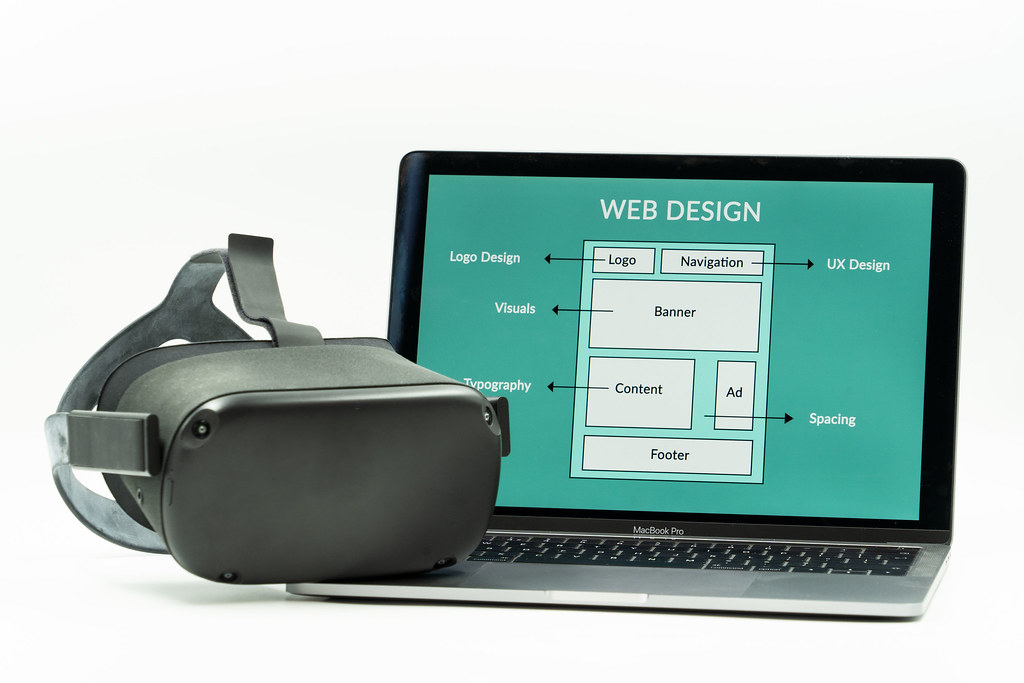
A responsive website should adapt to different screen sizes without hiding essential information or forcing visitors to zoom. Design the most important mobile journey first, then expand the layout for larger screens. Buttons should be easy to tap, forms should be simple to complete, and content should not overflow horizontally.
Test real pages on multiple screen widths, not just a single preview inside the page builder. Check menus, product filters, forms, sticky elements, pop-ups, and checkout steps. Pay special attention to intrusive overlays that cover the content or make it difficult to dismiss a message. These mobile checks are essential to website design optimization.
7. Write Helpful, Search-Focused Content
Search optimization begins with understanding what a visitor is trying to find. Effective website design optimization pairs one clear primary topic with direct answers to likely questions. Use the main phrase naturally in the page title, introduction, relevant subheadings, and image alt text when it accurately describes the image. Do not repeat keywords unnaturally or add them where they do not belong.
Use descriptive URLs, useful title tags, compelling meta descriptions, and clear internal links to related pages. Make sure each page has a distinct purpose so several pages on your site do not compete for exactly the same search intent.
Publish content that demonstrates first-hand knowledge, explains trade-offs, and gives readers practical next steps. Review older articles for accuracy, remove outdated claims, and update them when the underlying advice changes. There is no magic word count that guarantees a search ranking; completeness and usefulness matter more than padding.
8. Use Clear Calls to Action and Build Trust
Every important page should make the next step obvious. Use specific call-to-action (CTA) labels such as “Request a Quote,” “Book a Consultation,” or “View Plans” instead of vague wording. Match the CTA to the visitor’s stage and avoid overwhelming people with several competing primary actions.
Support decisions with genuine trust signals: clear contact details, transparent pricing or next steps, relevant case studies, authentic reviews, recognizable payment options, and a privacy policy. Never invent testimonials or display credentials you cannot verify. Keep contact forms short and explain what happens after submission.
9. Strengthen Website Security and Technical SEO
Website design optimization also includes security and maintenance. Keep your content management system, themes, and plugins updated, remove software you no longer use, and maintain tested backups. Use HTTPS and strong account authentication, and limit administrator access to people who need it. A secure website helps protect your business and the information visitors share.
For technical SEO, check that important pages can be crawled and indexed, use canonical URLs correctly, fix broken internal links, and submit an XML sitemap through Google Search Console. Add structured data only when the page qualifies and the markup accurately reflects visible content. Avoid thin duplicate pages and make sure important content is accessible without requiring unnecessary interactions.
10. Measure Results and Improve One Thing at a Time
Website design optimization is an ongoing process, not a one-time launch task. Set a baseline before changing a page, then review metrics that match your business goal. Useful measures may include qualified enquiries, completed bookings, sales, form completion rate, organic clicks, engagement, and page performance.
Use analytics and user feedback to identify friction. If enough traffic is available, run controlled A/B tests with one meaningful change at a time. Avoid declaring a winner from a handful of visits or changing several variables at once, because you will not know what caused the result. Document the hypothesis, test period, outcome, and next action.
Choosing a Website Builder for Better Design Control
A visual website builder can help teams create layouts and manage page content without hand-coding every section. The right choice depends on your budget, technical skills, performance needs, accessibility requirements, maintenance plan, and how much control you need over the final code.
If you use WordPress and want a visual page-building workflow, explore Elementor’s website builder to review its features and plans. This is an affiliate link, which means Gowebs.id may earn a commission if you make a qualifying purchase, at no additional cost to you. Evaluate the current plan details and test performance before choosing a tool.
You can also review our website development projects to see examples of work delivered by Gowebs.id. Choose tools because they fit your goals, not because a builder promises that a website will automatically rank or convert.
Website Design Optimization Checklist for 2026
- Each key page has a clear audience, purpose, and primary CTA.
- Brand colors, typography, headings, and spacing are consistent and readable.
- Navigation and forms work on mobile and with a keyboard.
- Images and videos are compressed, correctly sized, and not needlessly blocking the page.
- Important pages load reliably and layout shifts are minimized.
- Titles, meta descriptions, URLs, headings, and internal links accurately describe the content.
- HTTPS, software updates, access controls, and recoverable backups are in place.
- Analytics track meaningful business outcomes, and changes are reviewed against a baseline.
Frequently Asked Questions
What is website design optimization?
Website design optimization is the process of improving a website’s layout, usability, accessibility, speed, content, and conversion paths so visitors can achieve their goals more easily.
What matters most when optimizing a website in 2026?
Start with a clear value proposition, mobile usability, helpful content, reliable performance, accessible interactions, technical SEO, and a measurable conversion goal. Prioritize changes based on evidence from visitors and business data.
Does website design affect SEO?
Design can support SEO by making content easier to understand, improving mobile usability, helping users navigate, and supporting good performance. Design alone does not guarantee rankings; content relevance, technical accessibility, competition, and many other factors also matter.
How can I improve website loading speed?
Start by measuring real performance. Then optimize image sizes, defer nonessential scripts, reduce unnecessary plugins and third-party widgets, use caching appropriately, and improve server response time where needed. Re-test after each major change.
Can Elementor help optimize a WordPress website?
Elementor can provide visual tools for building and editing WordPress pages. Overall performance and SEO still depend on the implementation, hosting, media, plugins, content, and maintenance choices you make.
Final takeaway: The strongest website is not simply the one with the most elaborate visual effects. It is the one that helps the right audience understand your offer, find what they need, trust your business, and take the next step. Use these ten website design optimization practices as a practical checklist, measure their effect, and keep improving based on evidence.

No Comments